Pay $30 for the camera. Cash falls by $30, while the same $30 becomes stock at cost. Nothing has sold yet.
Full-history contribution so far$0
−$30 cash + $30 stock at cost = $0 contribution
Step 1 of 4. Buy the camera. Full-history contribution so far $0.
Cash after purchases−$30
+
Stock still on hand, at cost$30
=
Realized contribution$0
Adjust this one fictional cost. The earlier loss stays in the full history.
Return postage in US dollars, between zero and twenty. The original teaching example uses six dollars.
Inspect the records behind the story
Fictional USD records. Changes at each event; totals shown through the selected stage.
Record
Cash change
Stock change at cost
Contribution change
R002 · Buy camera
−$30
+$30
$0
Through this stage
−$30
$30
$0
Source records: R002 camera, S002 first sale, RT001 return and S003 resale from the workbook's fictional worked example.
Interactive explanation of fictional records, not the workbook interface or a customer result. The $12 fee credit is an entered example, not an automatic marketplace policy. Contribution excludes overhead, labor, income tax and unentered costs.
Paid download is an XLSX workbook for desktop Google Sheets import; the web demonstration is not included. Manual entries, one physical item per SKU, no marketplace sync.
Give the physical item a unique SKU. Keep its purchase cost and first sale record, including actual fees, shipping and packaging. In this example the camera cost $30 and the first sale received $100. After $25 in selling costs and its $30 cost basis, the first sale contributes $45.
Attach the return to that sale.
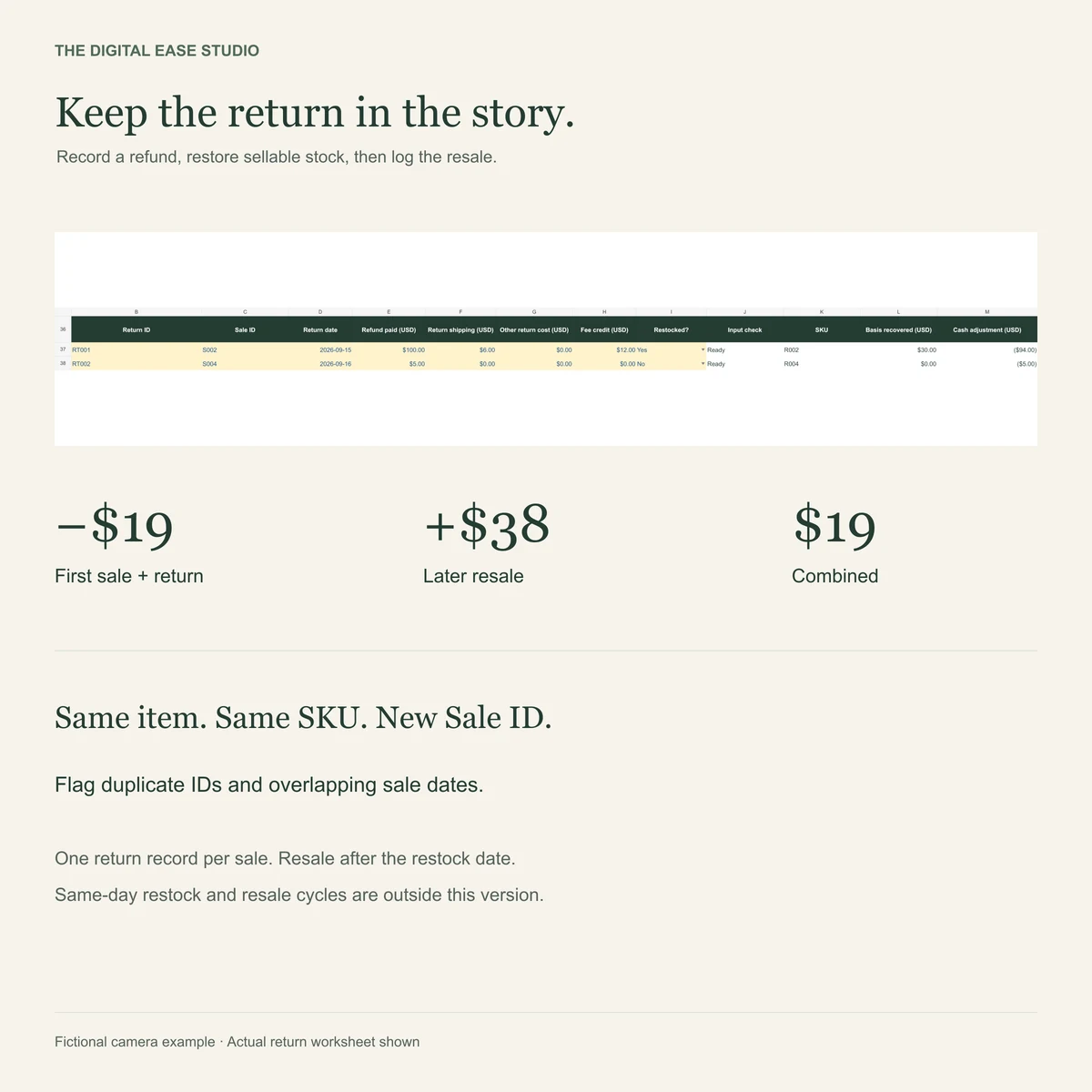
Record the $100 refund, $6 return shipping and the $12 fee credit actually received. The cash adjustment is −$94. These are fictional entered values, not a platform fee policy.
Restore stock when it is sellable again.
The same camera returns to stock at its $30 cost basis. Its original purchase is recorded once. After the full sale-and-return cycle, cash is −$49 and stock at cost is $30: −$19 contribution.
Give the resale its own Sale ID.
The next sale receives $90, with $12 fees, $8 postage and $2 packaging. Its $38 contribution combines with the earlier −$19 to leave $19 across the full item history.
Contribution here excludes overhead, labor, income tax and unentered costs. It is not complete accounting or tax guidance.
KEEP THE WORKFLOW · $19 USD ONCE
Give each item a complete record.
The Reseller Inventory & Profit System connects manually entered stock, sales and returns in a spreadsheet. Inspect the actual workbook, capacity and setup before choosing.
XLSX + PDF Quick Start + written guides. Import into desktop Google Sheets. One physical item per SKU. No platform sync.
Actual paid workbook preview, with fictional teaching records.
COMMON QUESTIONS
Check the details.
Does refunding the buyer automatically reverse every cost?
Do not assume it does. Record the refund paid, return shipping and actual fee credits separately. This example uses a $12 entered fee credit; it does not state any marketplace's current refund policy.
Should I create a new stock item when it is resold?
In this workbook's individual-item workflow, keep the same physical item under one unique SKU. The resale has a new Sale ID. Sellable returned stock restores the item's cost basis without recording its purchase twice.
Is this the interface included with the paid download?
The web demonstration explains fictional records. The paid product is an XLSX workbook and guides, manually imported into desktop Google Sheets. Actual workbook previews are shown above. The web interface is not part of the download.
What if I only need to check a sale with no refund?
Use the free one-sale profit check. It covers one completed sale without a refund; returned-item history belongs in the linked records shown here.
A little help improving these tools?
Optional PostHog analytics measures visits, tool actions and shop clicks. Calculator entries stay in your browser. Privacy details